


Release 2026.2#
Release Notes#
This release adds project writing goals with daily progress tracking, and a much improved project search with new filters. There are also new manuscript tools, including EPUB export and dialogue statistics, and several new features for the text editor, such as hover cards, zoom, and adjustable line height.
Attention
Note that the 2026.2 release will upgrade your project file structure, so once you’ve accepted the upgrade notice when opening a project for the first time, you will not be able to open it in earlier versions of novelWriter.
Project Writing Goals#
You can now set writing goals for your project and track your progress towards them on a daily basis. Progress is shown as colour-coded progress bars in the status bar of the user interface. The daily progress resets automatically when you start writing on a new day. Only content in novel root folders is counted, and if your project has multiple novel folders, you can exclude some of them from the count in the project settings.
Note that the progress bars are only visible once you’ve set some writing goals, so to get started, go to the new Goals tab in Project Settings and set them up!
Improved Project Search#
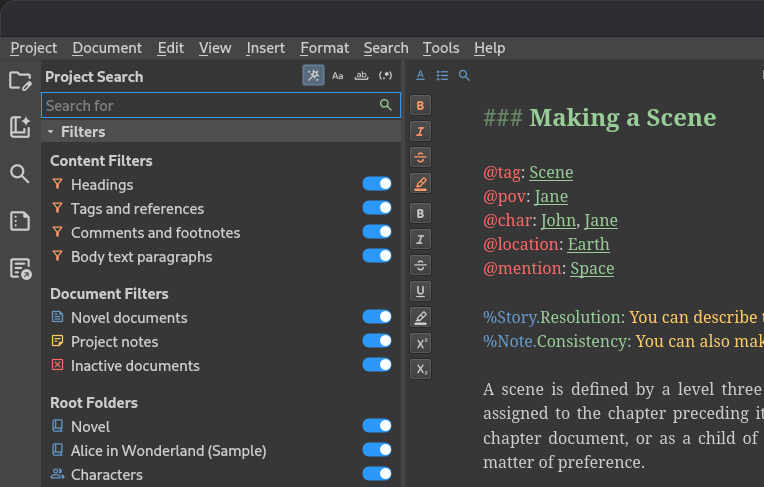
The project search tool now has a collapsible filter panel below the search box, letting you narrow your search results by text content, document type, and root folder. In addition, when you search in the editor, all matches for your search term in the open document are now highlighted at once, not just the one currently selected, making it much easier to see where else the term appears.
New Manuscript Features#
novelWriter can now export your manuscript as an EPUB 3 file, alongside the existing output formats.
A new dialogue statistics view shows the number of characters used in dialogue, and the ratio of dialogue to prose text, for your manuscript. The statistics panel has moved from below the manuscript preview to its own tab in the panel on the left, alongside the outline and manuscript settings.
A few other manuscript features have also been added:
You can insert a horizontal rule across the page in your manuscript by using four hyphens (
----) as the heading format.The page break marker shown in the manuscript preview has changed from a solid block of text to a dashed line, and a font kerning issue when printing the preview on Windows has been fixed.
Manuscript Build Settings has a new option to enable or disable justify-expansion of lines with manual line breaks, now also available for the Open Document and Word Document formats.
Text Editor Improvements#
Several improvements have been made to the text editor and viewer:
You can now zoom the text in the editor and viewer in and out using the standard zoom shortcuts.
A new setting in Preferences lets you adjust the line height of the text in the editor and viewer.
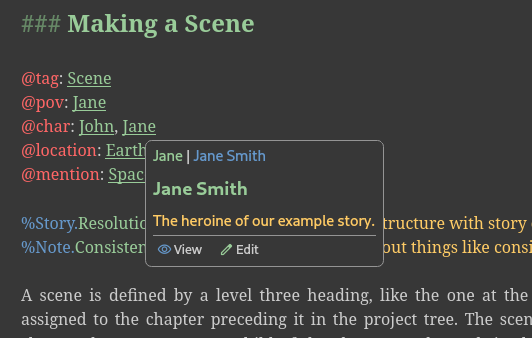
Hovering over a tag in the editor or viewer now shows a hover card with buttons to quickly open the referenced document for editing or viewing.
You can now paste rich text (HTML) into the editor, and it will be converted to novelWriter style markup. Copying text out of the editor still produces plain text as before.
A new format checker highlights trailing spaces at the end of lines, in addition to the existing check for multiple spaces between words.
The editor’s auto-complete menu has been rewritten to use a more native look, with improved keyboard handling: arrow keys navigate the list, Left and Escape close it, and Tab, Enter, Return, and Right accept the highlighted entry.
The symbol auto-replace feature can now also be used in the editor’s search and replace boxes, the project search box, and the header format field in Manuscript Build Settings, and can be toggled on or off independently in each.
User Interface#
Toggle buttons, such as those in the search tools, are now easier to see when active, using a new theme colour. Search matches in the editor and project search results also use a new highlight colour, which now updates immediately when you switch themes.
Tooltips and scrollbars once again correctly match your selected colour theme, after a compatibility issue with newer versions of Qt had caused them to use the wrong colours. Some issues with how long labels are handled in switches, and in the quick link and header navigation menus, have also been fixed.
Other Changes#
The automatic backup feature has a new setting for how often backups are made. You can set backups to run per session as before, or limit them to at most once per day, week, or month, in which case the previous backup for that period is overwritten instead of a new one being created every time.
You can now recursively set the active or inactive state of all documents under a folder from the project tree’s right-click menu.
The Tools menu now shows a checkbox for the active project’s spell check language, and the spell checker re-runs automatically whenever you change it.
The item details panel below the project tree and novel view can now be collapsed.
Performance of the spell checker has been substantially improved, and very long paragraphs are now skipped by syntax highlighting and spell checking to keep large documents responsive.
Patch Releases#
Patch 2026.2.1#
Release Date: 26 September, 2026
This is a patch release that fixes a minor issue with the theme on the new hover cards. It also adds a warning to users who installed via the now deprecated Launchpad PPA. French and Russian translations have been updated.
Patch 2026.2.2#
Release Date: 11 October, 2026
This is a patch release that fixes a bug where some unexpected symbols in the text could break manuscript documents for Libre Office and Word. Paragraphs following a horizontal ruler in the manuscript are no longer indented when first line indent is enabled. The French translation has been updated.
Download Links#
Linux  #
#
AppImage#
The AppImage should run on any recent Linux distro.
Flatpak (Experimental)#
The Flatpak should run on any recent Linux distro.
Debian Packages#
Packages for Debian, Ubuntu and Linux Mint can be downloaded from the Cloudsmith repository.
See Installing on Linux for more details.
Free package repository hosting is graciously provided by Cloudsmith.
Windows  #
#
Setup Installer#
This is a standard setup installer for Windows. It is made for Windows 10 or newer.
novelwriter-26.2.2-amd64-setup.exe [103 MB] Checksum File
Free code signing is provided by SignPath.io, certificate by SignPath Foundation.
Other Packages  #
#
Python Wheel#
A standard Python wheel package is available for installation from PyPi.
pipx install novelwriter==26.2.2
See Installing from PyPi for more details.
Source Code#
The source code packages are archived files of the entire source code.
See also the novelWriter Repository.
Note
For the time being, the MacOS releases have been discontinued. There is currently no one available to maintain these releases. This is an open source project, and it depends on volunteers and contributors to run. See this discussion for more details.
If you own a Mac and have a Python environment set up, you can still install the Python package of novelWriter and run the latest release. See Installing from PyPi for more details.
Older Releases#
Past release packages are available for download on GitHub.